Most self-service salvage yards make the same mistake when they expand into new towns. They copy the homepage, swap the city name, and call it done. Google sees straight through that, and the page never ranks.
Learning how to build city pages correctly can help salvage yards reach customers searching in nearby markets. The goal is not to create dozens of pages with only the city name changed. Effective city pages should show why your yard serves that area, what customers can expect, and why they should choose your business over other options.
This guide covers how to build city pages for a self-service salvage yard the right way, ones that actually rank instead of getting filtered out as duplicate content. You’ll get what belongs on the page, how to make every location genuinely unique, and a real example structure you can copy for your own service area.
Building unique city pages helps search engines understand the areas your salvage yard serves, but these pages work best when they’re part of a broader Local SEO for Salvage Yards strategy.
📌 KEY TAKEAWAYS
- Google doesn’t penalize localized content outright, but it does filter near-identical city pages, only one shows up in search, the rest stay buried.
- Service-area pages, not location pages – a single-location self-service yard needs pages for towns customers travel from, not fake second locations.
- Beyond the basics – admission fee, tool policy, and area-specific inventory belong on the page, details generic templates always skip.
- The “swap the city name” mistake is the fastest way to guarantee only one page ever ranks, real photos, local context, and area-specific FAQs are what make a page unique.
- A real example structure – hero, why-choose-us, how it works, parts list, map and NAP, hours, adjusted per town instead of copy-pasted.
- Three to six pages is usually enough for a single-location yard, prioritize towns that actually send customers, not every town within driving distance.
Why City Pages Matter for a Self-Service Yard (Even With Just One Location)
Most owners assume city pages are only for businesses with multiple physical locations. That’s not true for a self-service yard. Even with one lot, your customers are pulling from a much wider area, and a single homepage can’t rank for every town’s worth of searches.
Service-Area City Pages vs Multi-Location Pages (You Likely Need the First One)
There are two different kinds of city pages, and mixing them up is where most yards go wrong.
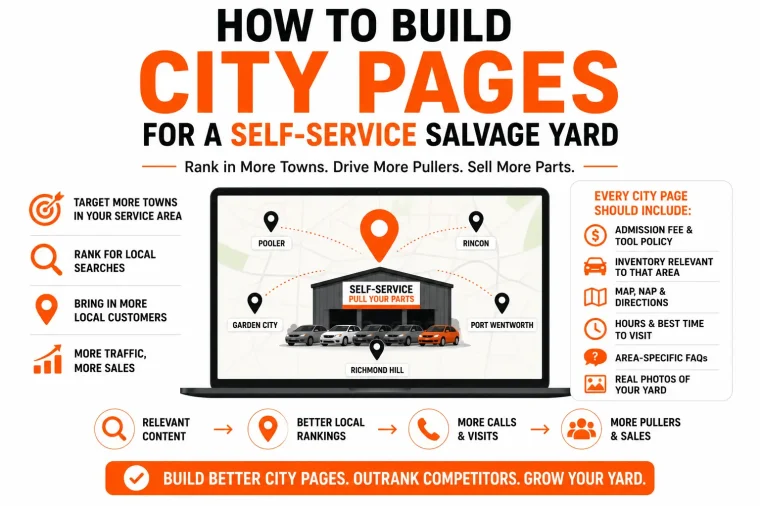
A multi-location page exists because you physically operate a yard in that city. A service-area page exists because customers from that city drive to your one yard to pull parts. If you run a single lot in Savannah but pullers regularly come from Pooler, Garden City, and Port Wentworth, you don’t need three separate yards, you need three service-area pages, each one built around “used auto parts near [town]” or “self-service salvage yard serving [town].”
That distinction matters because it changes what goes on the page. A multi-location page needs its own address, hours, and staff. A service-area page needs driving distance, what’s typically available for that area’s demand, and why pullers from that town choose to make the drive. Get this right from the start, and you avoid building pages that read like they’re pretending to be a second yard you don’t actually have.
How Salvage Yards Can Build City Pages That Rank
When you build city pages for a salvage yard, each page needs to target a specific local search intent. A strong city page connects your inventory, services, location, and customer needs in that market.
A successful salvage yard city page should include:
- The city and surrounding areas you serve.
- Directions and distance information.
- Available parts and vehicle inventory details.
- Local customer questions and concerns.
- Internal links to relevant services and inventory pages.
- Unique information that separates one city page from another.
The purpose of these pages is not just ranking for a city name. It is creating a useful landing page that helps customers decide to visit your yard.
Beyond the Basics: What a Self-Service City Page Actually Needs
Map, NAP, and hours are already covered in our 12 Pages Every Yard Needs to Rank guide, so this section skips the checklist basics and goes straight into what a generic junkyard template leaves out entirely.
Self-Service-Specific Content Generic Templates Skip (Admission Fee, Tool Policy, What's Currently in Stock for That Area)
Most city page templates were built for full-service yards or generic auto shops, and it shows. They cover hours and directions, then stop. A self-service yard has an entirely different set of questions a puller needs answered before they drive out, and skipping them costs you the visit.
Admission fee is the first one. If your gate charges two to five dollars, say so on the page. A puller deciding between your yard and one three towns over will pick based on total cost, not just distance, and an unlisted fee reads like something you’re hiding.
Tool policy comes next. State plainly whether pullers bring their own tools or whether you supply basics like engine hoists or wheel carts. This single detail determines whether someone shows up prepared or turns around at the gate.
Current inventory relevant to that area matters too. A city page that only lists your general inventory link misses the point. If pullers from a specific town tend to search for certain makes and models, a short, honestly updated note on what’s typically moving through your yard gives that page a reason to exist beyond a location stub.
None of this is generic “About Us” copy. It’s the exact information a self-service customer is trying to find before they decide which yard is worth the drive, and it’s exactly what a copied, city-name-swapped template never bothers to include.
The Duplicate Content Trap (And Why It Costs You Rankings, Not Just Quality)
Duplicate content doesn’t just look lazy. It actively splits your ranking power across pages that are competing with each other instead of your competitors, and most yard owners have no idea it’s happening on their own site.
Choosing Salvage Yard City Page Keywords
Choosing the right salvage yard city page keywords is important because every market has different search behavior. Some customers search for a salvage yard by city, while others search by service area, nearby location, or specific parts.
Examples of keyword groups include:
- Salvage yard + city name
- Junkyard near + city name
- Used auto parts + city name
- Self-service salvage yard + city name
Matching each page with the correct search intent helps avoid creating pages that rank poorly or attract the wrong visitors.
What Google Actually Does With Near-Identical City Pages
Google doesn’t usually penalize duplicate pages outright. It filters them. When two pages are 90% or more the same, Google picks one to show in search results and buries the rest, even if you built five city pages hoping to rank in five towns.
Worse, near-identical pages split whatever authority your site has between them instead of concentrating it on one strong page. You end up with five weak, competing pages instead of one page that could have ranked well on its own. That’s the real cost, not a quality complaint from Google, a direct hit to your visibility in every town you tried to target.
The "Swap the City Name" Mistake Most Yards Make
This is the most common way independent yards accidentally create duplicate content. Build one city page, copy it, change the city name, publish it, repeat. It feels efficient. It’s actually the fastest way to guarantee only one of those pages ever ranks.
Other ways this happens without anyone noticing: service pages that repeat the same paragraph structure with only the service name swapped, an inventory page duplicated across multiple URLs, or blog posts that rehash the same points as an existing page under a new title. Any two pages on your own site that read almost the same to a person read almost the same to Google, and Google will only reward one of them.
The fix isn’t complicated, but it does take real effort per page: unique photos, unique local details, unique customer proof points, unique FAQs. We’ll walk through exactly what that looks like next.
Expanding Into Nearby Cities With Salvage Yard Pages
Salvage yards can expand their organic visibility by creating pages for nearby cities where customers already travel from. However, these pages should only target realistic service areas.
Strong nearby city pages explain:
- How far the yard is from that city.
- Why customers from that area visit.
- What services and inventory are available.
- How customers can reach the yard.
Creating useful pages for nearby markets can increase visibility without relying only on searches from your main location.
Internal Linking Strategy for Salvage Yard City Pages
Internal linking helps Google understand how your city pages connect with your overall website structure. Each city page should link naturally to related services, inventory categories, and supporting content.
For example:
City page → used auto parts page
City page → vehicle recycling service
City page → inventory search page
A strong internal linking structure distributes authority and helps users move deeper into your website.
How to Make Every City Page Genuinely Unique
Uniqueness doesn’t mean rewriting the same paragraph with different synonyms. It means each page has something the others genuinely don’t, real details that only apply to that town’s customers.
Real Photos, Real Inventory, Real Local Context Per Page
Start with what a puller from that specific town would actually search for. If pullers from one nearby city tend to look for domestic trucks and pullers from another lean toward imports, reflect that on each page instead of listing the same generic inventory blurb everywhere.
Photos matter more than most yards think. A stock photo or the same handful of images recycled across every city page tells Google, and the reader, that this page wasn’t built with any real thought. Even a few real, current photos tied to that page’s context go a long way.
Local context rounds it out. Mention drive time from that town, a recognizable cross street or landmark pullers from that area would know, and anything specific to serving that community, a local partnership, a regular customer base from that side of town, anything that couldn’t be copy-pasted onto a different city’s page without sounding wrong.
Area-Specific FAQs and Local Proof Points
A shared FAQ block repeated on every city page is still duplicate content, even if it’s useful information. Build a few questions specific to that town instead. “How far is the yard from [town],” “is there a self-service yard closer to [town] than the chain location,” questions a searcher from that specific area is actually typing.
Proof points work the same way. A review or a short customer story from someone in that town does more for that page’s uniqueness and trust than five generic five-star quotes reused everywhere. If you don’t have area-specific reviews yet, even a short note like “regularly serving pullers from [town]” tied to real visit patterns is a start, just don’t fabricate detail that isn’t true.
The test for every page before you publish it: could someone tell which city this page is for without reading the H1. If the answer is no, it’s not unique yet.
A Real Example: Structuring a City Page for a Self-Service Yard
One of our client’s yards has a live page built exactly around this structure. It’s worth walking through section by section, both what’s working and what changes if you’re building a page for a nearby service-area town instead of your home city.
Section-by-Section Breakdown
- Hero section. Clear H1 naming the city, a one-line value prop (save up to 70% vs new parts), and two immediate CTAs, search inventory and contact. No scrolling required to know what the page offers or what to do next.
- Why choose us block. Three short value points, save money, huge inventory, fast pickup, each with a real photo, not stock imagery. Keeps it scannable instead of a wall of text.
- How it works. A simple three-step process, search or visit, locate your vehicle, pull your part and check out. This is where self-service specifics belong, and it’s a good spot to add admission fee and tool policy if the client’s live version doesn’t already.
- Parts available list. A short, specific list of what’s commonly in stock, engines, transmissions, doors, electronics, not a vague “we have everything” line. Links straight to the full search inventory tool.
- Map and NAP block. Embedded Google Map, address, phone, and full hours, placed right on the page instead of buried in the footer only.
- Hours callout. Full weekly hours listed clearly, matching what’s on the Google Business Profile exactly, this is where NAP consistency actually gets tested.
What to adjust for a service-area town instead of your home city: swap the hero to name the nearby town directly, “Used Auto Parts Near [Town],” add a line on drive time or distance, and if the client operates one yard, be upfront that this page serves that town rather than implying a second location exists there.
This structure works because every section earns its place, nothing is filler, and it’s specific enough that copying it for a second town by name-swap alone would immediately fail the uniqueness test covered earlier.
How Many City Pages Should a Self-Service Yard Actually Build
There’s no fixed number that works for every yard, but there is a wrong way to decide it. Building a page for every town within an hour’s drive because you can is exactly how yards end up back in the duplicate content trap covered earlier.
Prioritizing by Service-Area Reach, Not Vanity
Start with actual customer data, not a map radius. Look at where your foot traffic and phone calls really come from, GBP insights, checkout ZIP codes if you track them, or just what staff hear at the counter. Towns that consistently send real customers deserve a page. Towns that show up once or twice a year don’t.
A single-location yard usually does well with three to six service-area pages, covering the towns that make up the bulk of actual drive-in traffic, not every town technically within range. More than that, and you risk thin, rushed pages that hurt more than they help, since each one needs the real, unique content covered earlier to be worth building at all.
Quality beats coverage here. One well-built page for a town that sends real customers outperforms five thin pages built just to claim more search real estate. If you’re not sure a town deserves its own page yet, it’s fine to start smaller and add pages as demand proves itself.
Salvage Yard Location Page SEO Best Practices
Salvage yard location page SEO requires more than adding a city name to an existing page. Google needs clear signals that the page is relevant to customers in that specific area.
Each location page should have:
- Unique title tags and meta descriptions.
- Location-specific content.
- Relevant internal links.
- Customer reviews or local proof.
- Information about services available in that market.
A properly optimized location page helps search engines understand where your salvage yard operates and improves your ability to appear for nearby searches.
Frequently Asked Questions
Not exactly. Google doesn’t apply a direct penalty for localized content, but it does filter out pages that look too similar. Only one page shows up in search, and the rest stay buried, even if you built five.
Most single-location yards do well with three to six city pages, covering the towns that actually send real customers. Building pages for every nearby town just to claim more search space usually backfires.
Real local details make the difference: real photos, area-specific FAQs, drive time or landmarks, and inventory notes relevant to that town. Swapping only the city name in an otherwise identical page counts as duplicate content.
No. Reusing the same FAQ block on every page is still duplicate content, even if the answers are accurate. Each page should include a few questions specific to that town’s searchers.
A location page is for a city where you physically operate. A service-area page is for a nearby city your customers travel from to reach your one yard. Self-service yards with one lot almost always need service-area pages, not location pages.
Ready to build city pages that actually rank?
When you build city pages strategically, you create more opportunities to reach customers beyond your primary location. For salvage yards, these pages become valuable entry points for people searching for parts, recycling services, and nearby yard options.
Copying the same page and swapping the city name isn’t a strategy, it’s a filter waiting to happen. If you want city pages built the right way, unique, local, and structured to actually rank in your service area, that’s exactly what we do for independent self-service yards.