
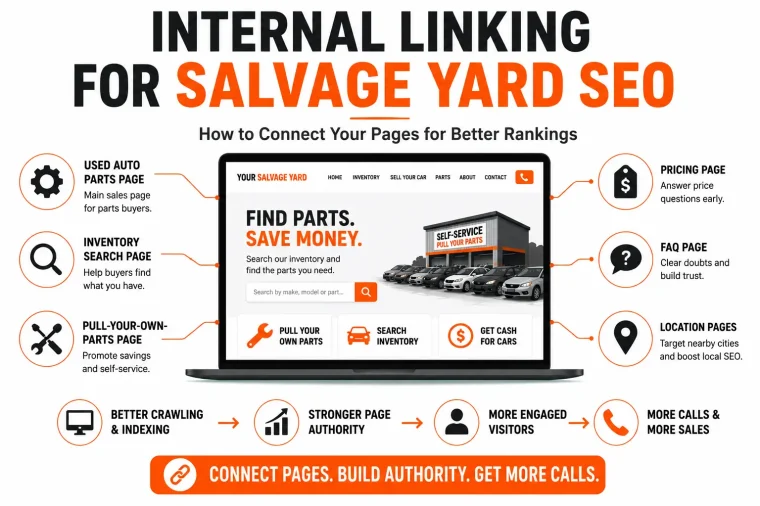
Internal linking for SEO means connecting relevant pages within your website so visitors can find useful information and search engines can discover your content. For a salvage yard, those connections help parts buyers move toward inventory, pricing, and visiting details, while vehicle sellers can reach the information they need to request an offer.
This guide explains where to place internal links, how to write descriptive anchor text, and how to audit existing pages. You’ll find practical examples for connecting articles, inventory listings, location pages, and customer information.
📌 KEY TAKEAWAYS
- Internal linking is your website talking to itself, without it, Google can’t find your best pages and buyers hit dead ends instead of your inventory or pricing.
- Five core pages every yard needs linked – Used Auto Parts, Inventory Search, Pull-Your-Own-Parts, Pricing, and FAQ, every blog post should connect back to at least one.
- Link volume that works – Add internal links where another page provides information the reader needs. The useful number depends on the subject, page length, and available resources.
- Three link types to use – contextual links inside content, navigation links in your menu and footer, and related content links to keep readers browsing.
- Repeatable process – map your core pages, group blog posts around each one by topic, add 3-5 links with descriptive anchor text, and audit old posts regularly.
- Common mistakes to avoid – links that only point to the homepage, a buried PYOP page, dead-end blog posts, and an isolated FAQ page nobody gets sent to.
- Ends with a quick checklist to self-audit your internal links before you hit publish.
What Is Internal Linking (In Plain English)
An internal link takes a visitor from one page to another within the same website. Links in navigation menus, article text, breadcrumbs, and related resources all help connect your content.
For example, an article about finding a replacement alternator could link to your inventory search where it explains how to check donor vehicles. A section about visiting the yard could link to admission fees and tool requirements. Each link should help readers complete the task described in the surrounding text.
Why Internal Linking for SEO Matters for a Salvage Yard
Salvage yards run on volume. More admissions, more off-street car buys, more parts sold. Internal linking touches all three, and here is how.
- Helps Google Find and Trust Your Pages
Google crawls your site by following links. If your inventory search page or your pricing page is not linked from anywhere, Google may never index it properly. That means it will not show up in search, no matter how good the content is. Linking your pages together tells Google these pages exist and shows how they connect, which builds trust in your whole site.
Internal linking is only one part of a successful SEO strategy. To understand how technical SEO, local SEO, keyword optimization, and content work together with SEO for salvage yards, explore our complete guide on building a website that consistently ranks and attracts more buyers.
- Keeps Buyers Moving Toward a Purchase
Someone lands on your blog reading about cheap alternator prices. They are curious, not ready to buy yet. A good internal link takes them straight to your inventory search or your PYOP page while the interest is still fresh. Without that link, they read one page and leave. With it, they take the next step toward calling you or showing up at the yard.
- Boosts Your Weaker Pages
Some pages on your site rank well already. Your homepage, maybe your main inventory page. Weaker pages, like a new blog post or your FAQ, do not have that same authority yet. Linking from your strong pages to your weaker ones passes some of that ranking power along. Over time, this lifts your whole site instead of just one or two pages carrying everything.
The Core Pages Every Salvage Yard Site Needs Linked
Before you add a single link, you need to know which pages actually matter. These five are the backbone of most salvage yard sites. Every blog post, every service page, every location page should point back to one or more of these.
Before adding links, define the core pages on your salvage yard website and the purpose of each page. Optimizing your site’s structure, navigation, and content ensures both Google and your customers can easily find your most important pages.
- Used Auto Parts Page
This is your main sales page. It tells visitors what kinds of parts you carry and why buying used makes sense. Almost every blog post you write should link here somewhere, since this is where browsing turns into buying.
- Inventory Search Page
This is where curiosity turns into action. A visitor reading about a part they need should be one click away from checking if you actually have it. If this page is buried or hard to find, you are losing sales you already earned through content.
- Pull-Your-Own-Parts Page
Your PYOP program is a big draw for budget-minded customers. Any content about saving money, DIY repairs, or cheap parts should link here. This page deserves its own spotlight, not just a mention in the footer menu.
- Pricing Page
Buyers want to know cost before they drive out to the yard. Linking to your pricing page early in the buyer journey builds trust and cuts down on “how much is it” phone calls you have to answer one by one.
- FAQ Page
This page answers the small questions that stop people from acting. Admission fees, hours, what to bring, what payment you accept. Link to it from blog posts and service pages whenever a reader might have a lingering question.
Real Example: How a Blog Post Should Link Out
Let’s say you publish a blog post titled “How to Save Money on Used Auto Parts.” Here is how that single post should connect to the rest of your site.
Early in the post, when you mention buying used parts instead of new, link to your Used Auto Parts Page. This gives readers the main sales page right when the idea clicks for them.
When you talk about checking availability before making the trip, link to your Inventory Search Page. This is the moment they go from reading to actually looking for their part.
If you mention pulling your own part to save even more, link to your Pull-Your-Own-Parts Page. This catches the budget shoppers who want the deepest discount.
Somewhere in the middle or near the end, when discussing what to expect cost-wise, link to your Pricing Page. This answers the money question before they even have to ask.
Close the post with a link to your FAQ Page, especially if you mention admission fees, hours, or what to bring. This clears up any last hesitation before they head out.
One blog post. Five links. Each one moves the reader one step closer to showing up at your yard.
Types of Internal Links to Use
You do not need every type of internal link out there. For a salvage yard site, these three cover almost everything you need.
- Contextual Links (Inside Blog Content)
These are links placed naturally inside your blog posts and page content, like the ones in the example above. They carry the most weight because they sit inside real, relevant text. When you link the words “check our inventory” to your inventory search page, both readers and Google understand exactly what that page is about.
- Navigation Links (Menu and Footer)
These are the links in your top menu and footer. They stay the same on every page and help visitors reach your core pages, like Inventory, Pricing, and FAQ, no matter where they land on your site. Make sure your PYOP and Pricing pages are not buried three clicks deep. Keep them in the main menu if possible.
- Related Content Links
These show up at the bottom of blog posts, usually as “You might also like” or “Related articles.” They keep readers on your site longer by pointing them to other posts on similar topics. If someone reads about saving money on parts, showing them a related post on DIY repairs keeps them engaged instead of leaving after one article.
How to Build Your Internal Linking Plan
You do not need a fancy tool or a full day to get this right. Follow these four steps and you will have a solid linking plan in place.
- Map Your Core Pages First
Start with the five pages we covered earlier. Used Auto Parts, Inventory Search, PYOP, Pricing, and FAQ. Write them down. Every piece of content you create should tie back to at least one of these
- Group Blog Posts Around Each Core Page
Instead of writing random posts, group them by topic around each core page. Posts about saving money and DIY repairs group around your PYOP page. Posts about specific parts group around your Inventory Search page. This way, related content naturally links together.
- How Many Internal Links Should a Page Have?
Add internal links where another page provides information the reader needs. The useful number depends on the subject, page length, and available resources.
A short opening-hours announcement may need only a link to directions. A detailed guide to buying used parts may benefit from links to inventory, pricing, returns, and visiting rules.
Review each link in context. Its anchor text should describe the destination, and the destination should answer the question the surrounding paragraph raises.
- Use Natural Anchor Text
Skip generic phrases like “click here.” Use anchor text that describes what the reader is about to see, like “check our current inventory” or “see our PYOP pricing.” This helps readers know what to expect and helps Google understand what the linked page is about. To select useful link destinations, match keywords to buyer and seller intent rather than linking every keyword to the same page.
Common Mistakes Salvage Yards Make
Most salvage yard sites are not linking wrong on purpose. They just never think about it. Here are the mistakes we see most often.
- Only linking to the homepage. Every button and every mention pushes people back to the homepage instead of the specific page they need. This forces visitors to go hunting for what they actually came for.
- No links to the PYOP page. This program often gets buried in a menu instead of being linked from the content where it actually matters, like DIY and savings posts.
- Blog posts with zero links out. A post gets published, gets read, and the visitor has nowhere else to go. That is a dead end you built yourself.
- FAQ page left isolated. It sits there answering questions nobody gets linked to. Meanwhile people call to ask about hours or admission fees that are already answered on a page nobody sent them to.
- Inventory Search page missing from the main menu. If it takes more than one click to check inventory, some visitors will give up and call a competitor instead.
How to Find Orphaned Pages During an Internal Link Audit
An orphaned page has no incoming internal links from other pages on your website. A URL can appear in an XML sitemap while still lacking those links.
Compare the URLs found by a website crawl with your XML sitemap and published-page list. Investigate URLs that appear in those lists but were missing from the crawl. Check whether the crawler could access the relevant navigation, pagination, and rendered content before classifying a page as orphaned.
For each confirmed orphaned page, find an existing page where the topic naturally belongs. Add a descriptive link within the relevant section, then check that the destination loads correctly. Include important customer pages in navigation where appropriate.
| Source content | Suggested destination | Example anchor |
|---|---|---|
| Article about finding a donor vehicle | Inventory search | search current vehicle inventory |
| Explanation of part costs | Pricing page | view part prices and core charges |
| Guide for first-time visitors | Yard rules | check admission and tool requirements |
| Article about selling a non-running car | Vehicle-selling page | request an offer for your vehicle |
Quick Internal Linking Checklist
Use this before you hit publish on any new page or post.
- Does this page link to at least one of your five core pages?
- Are your core pages reachable from the main menu?
- Does every blog post have useful internal links, where another page provides information the reader needs?
- Is your anchor text descriptive, not “click here”?
- Does the FAQ page get linked wherever a buyer might have a lingering question?
- Are older blog posts updated with links to newer, relevant content?
- Is the PYOP page linked from every savings or DIY related post?
Frequently Asked Questions
Internal linking means adding links from one page on your website to another page on the same site. It helps Google understand your site structure and helps visitors move from one page to the next, like from a blog post to your inventory page.
There is no fixed number, but add internal links where another page provides information the reader needs. The useful number depends on the subject, page length, and available resources.
Yes. Internal links help Google find and index your pages, and they pass ranking power from your strongest pages to weaker ones. Sites with no internal linking structure often have pages that never get discovered at all.
Internal links point to another page on your own website, like your blog linking to your inventory page. External links point to a different website entirely, like citing a source. Both matter, but internal links are fully within your control.
Start by mapping your core pages, like Inventory, Pricing, and FAQ. Group blog posts around each one, add natural links inside your content, and review older posts regularly to link them to newer, relevant pages.
Stop Losing Traffic to a Website That Doesn't Talk to Itself
Every unlinked page on your site is money left on the table. A blog post with nowhere to click is a dead end. A pricing page nobody can find is a lost sale. Fix the connections and you fix the leaks.
Ready to see it done right? Explore our full range of SEO services built specifically for Self- service salvage yards.
Curious what your own site is missing? Book your free Yard Growth Strategy Call and we will show you exactly what’s costing you admissions and how to fix it fast.